
Damages Calculator Overview
The Damages Calculator helps you build a detailed schedule of damages for personal injury claims. You add heads of damages -- general damages, medical expenses, economic loss, attendant care, and more -- and the calculator handles the arithmetic: discount multipliers for future losses, pre-judgment interest on past losses, and a running grand total.
The philosophy is straightforward: throw things down on the page, rough and ugly, then dial it in. You do not have to worry about getting things right the first time -- you can massage the figures, make it visual, and focus on strategy rather than manual arithmetic. The less math you have to do, the more you can focus on the case and the client in front of you.
When to Use It
The Damages Calculator is designed for the stages of a claim where you need a structured, defensible schedule of damages:
- Preparing advice on quantum -- Build a schedule early to give your client a realistic range. Create separate best-case and worst-case schedules to illustrate the spread.
- Pre-mediation or settlement conferences -- Export a polished Word document to exchange with the other side. Use it alongside the Settlement Tracker during live negotiations.
- Court documents -- Generate a schedule of damages that can be annexed to pleadings or submissions.
- Internal file reviews -- Keep a current schedule on each case so supervisors or colleagues can see the claim valuation at a glance.
How the Interface is Structured
Top Bar
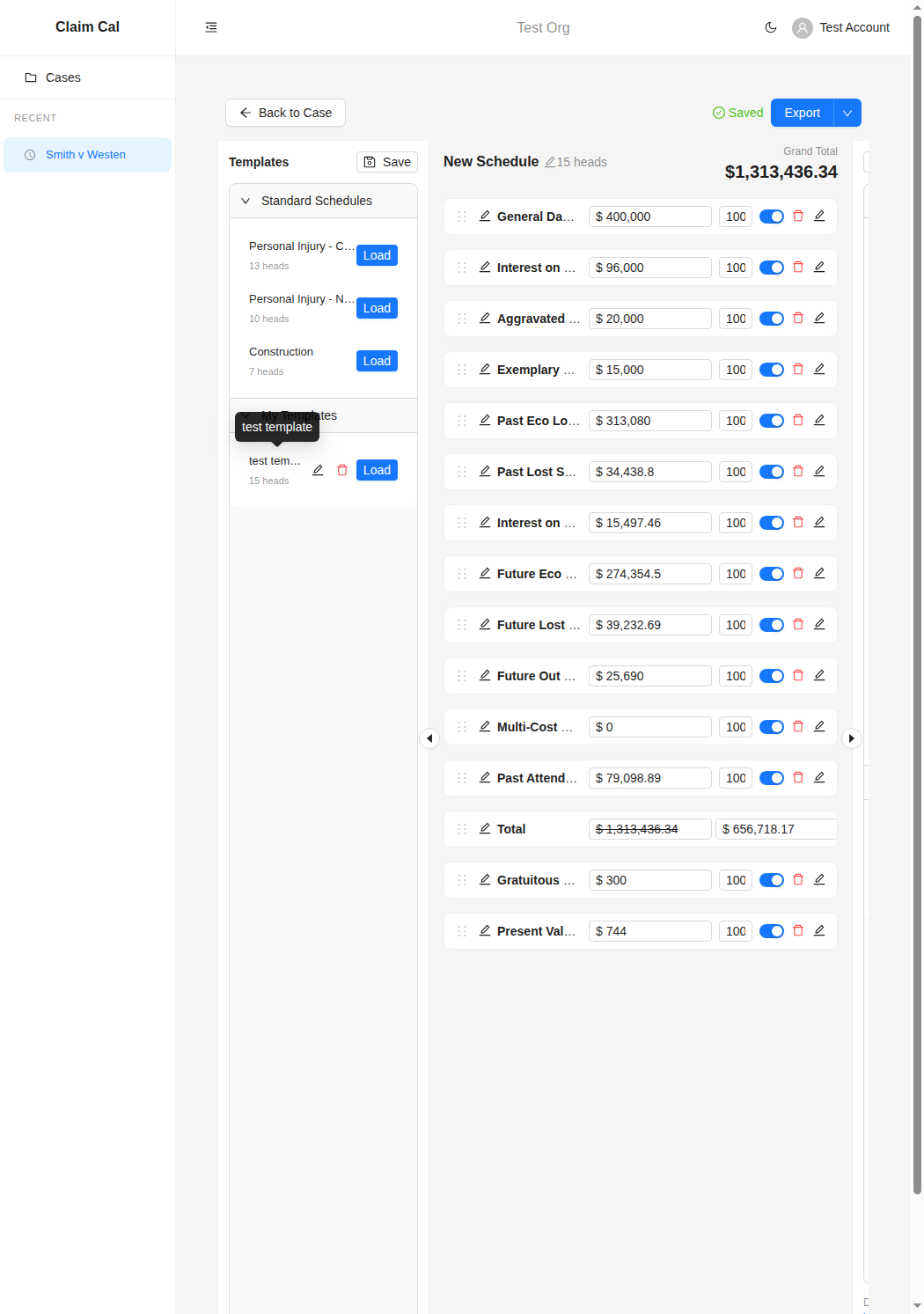
At the top of the page you will see:
- Back to Case -- Returns you to the case detail page.
- Schedule name -- Click to rename the schedule (e.g. "Best Case - Pre-Mediation").
- Saved indicator -- Shows whether your changes have been saved. The calculator auto-saves as you work.
- Export button -- A dropdown that lets you export the schedule as a Word document in table or detailed format.
Heads of Damages List
The main area displays your heads of damages as expandable rows. Each head shows:
- Head name -- The type of claim (e.g. "General Damages", "Past Eco Loss (Earnings)"). You can add a custom label to distinguish multiple heads of the same type.
- Calculated total -- The computed amount for that head, based on the inputs you provide.
- Expand/collapse -- Click a head to open its input panel, where you enter values like net weekly loss, dates, discount factors, and vicissitudes.
Grand Total
A running grand total appears at the bottom (or via a Total head), summing all enabled heads. Disable a head temporarily by toggling it off -- the total adjusts automatically.
Adding Heads
Use the Add Head control to choose from the full list of available head types. You can add the same type multiple times (for example, two separate periods of past economic loss) and reorder heads by dragging them.
Templates
If you find yourself adding the same set of heads across cases, you can save your current set of heads as a template. Name it, and reuse it on any future schedule -- for example, a "NSW Common Law" template with your standard heads pre-loaded. You can edit or delete templates at any time.
Video Walkthrough
Watch Ashley build a full common law schedule from scratch -- from adding heads like General Damages and Past Eco Loss through to applying a 70% attributable discount and exporting the finished schedule as a Word document:
Next Steps
- Building a Schedule of Damages -- Step-by-step guide to creating your first schedule.
- Working with Heads of Damages -- Detailed guide to each head type and how calculations work.
- Exporting and Sharing -- How to export your schedule as a Word document.