
How Pricing Works
Claim Cal uses a simple, transparent pricing model. There are no monthly subscriptions, no platform fees, and no hidden charges. You only pay when you create a case.
Per-Case Pricing
Each case costs $99 (inc. GST) to activate. This is a one-time fee per case -- there is no ongoing cost for that case, no matter how long you use it or how many times you return to it.
What Is Included
Every activated case gives you unlimited access to all three tools:
- Damages Calculator -- build complete schedules of damages with Word document export
- Economic Loss Analyser -- detailed past and future earnings analysis with ABS AWE data, tax calculations, and superannuation
- Settlement Tracker -- live negotiation tool with offer tracking, take-home calculations, and gap analysis
You also get:
- Word document export for damages schedules
- All regulatory data updates -- ABS AWE rates, RBA cash rates, attendant care rates, and more are kept current
- All future tool updates at no additional cost
3 Free Cases to Start
Every new organisation starts with 3 free cases. These work exactly like paid cases -- you get full access to all three tools and all features. No payment method is required to use your free cases.
If you have earned bonus cases through the Referral Program, these are added to your free case allowance. You can see your total free cases and how many remain on the Billing & Subscription tab in Org Settings.
💡 Tip
The $99 per-case fee is a recoverable disbursement. You can allocate it to the client's matter on your firm's invoice, just like a search fee or filing fee.
When Payment Is Taken
Payment works as follows:
- While you have free cases remaining, creating a new case uses one of your free cases. No charge is made.
- Once your free cases are used up, you need a payment method on file. Each new case is charged at $99 inc. GST at the time of creation.
- Payment is immediate -- the charge is processed when you click Create Case and confirm.
If you have not yet added a payment method and your free cases are exhausted, you will be prompted to add one before you can create a new case.
No Subscriptions
Claim Cal does not have monthly or annual subscription fees. You only pay for the cases you create. If you do not create any new cases in a given month, you pay nothing -- and you retain full access to all your existing cases and calculations indefinitely.
Viewing Your Billing Information
To review your billing details:
Click your avatar in the top-right corner and select Org Settings.
Click the Billing & Subscription tab.
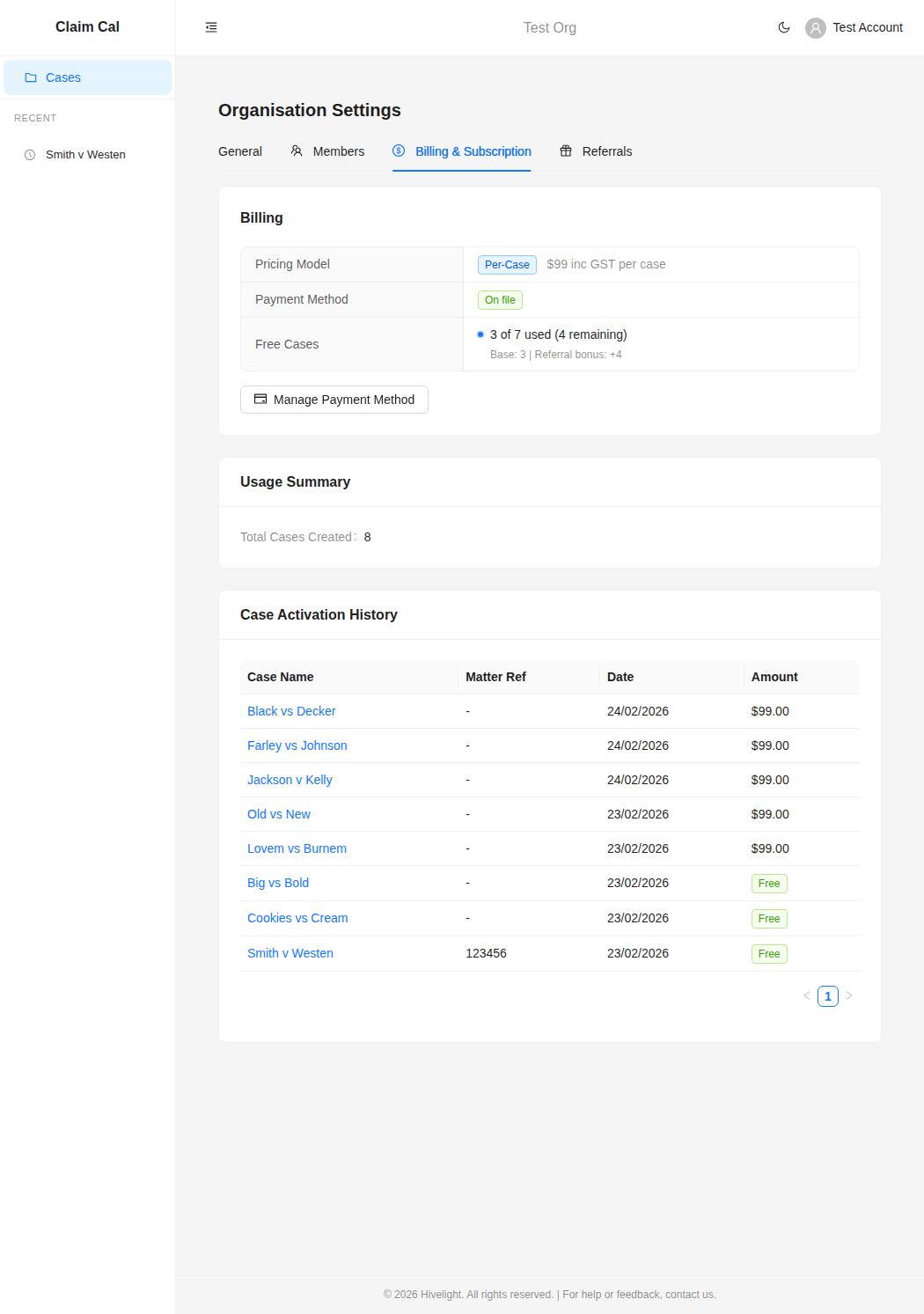
Here you will see:
- Pricing Model -- confirms the per-case pricing and amount.
- Payment Method -- whether a payment method is on file.
- Free Cases -- how many free cases you have used and how many remain, including any referral bonuses.
- Usage Summary -- total number of cases created.
- Case Activation History -- a record of every case created, showing the date and whether it was free or charged at $99.
Next Steps
- Managing Your Payment Method -- add or update your payment details
- Understanding Your Invoices -- track your spending and case history