
Understanding Your Invoices
Claim Cal provides a clear record of every case you have created, whether it was free or paid. You can review your full case activation history from the Billing & Subscription tab in Org Settings.
Viewing Your Case History
Click your avatar in the top-right corner and select Org Settings.
Click the Billing & Subscription tab.
Scroll down to the Case Activation History section.
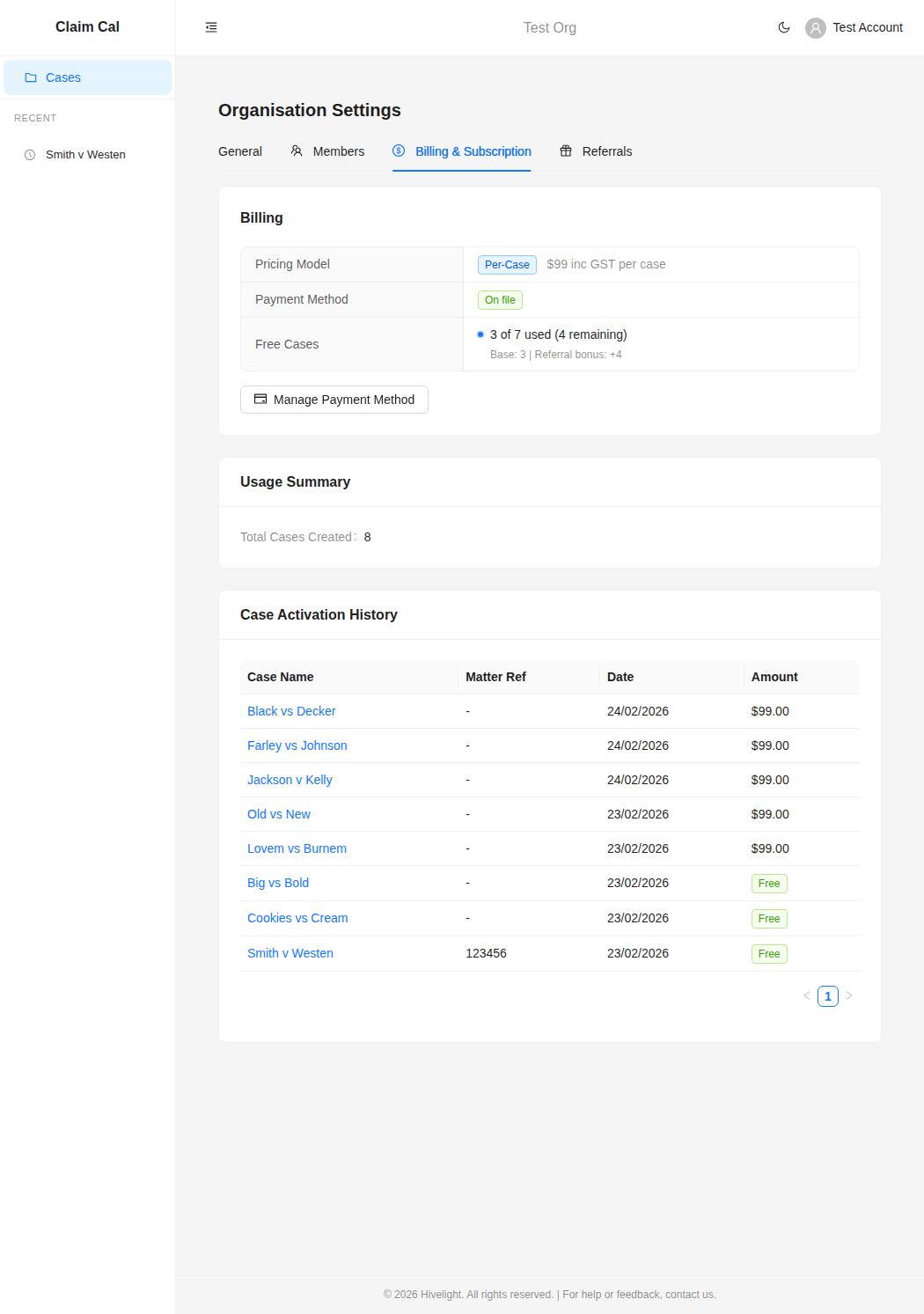
Reading the Case Activation History
The Case Activation History table lists every case that has been created in your organisation, sorted by date (most recent first). Each row shows:
| Column | Description |
|---|---|
| Case Name | The name of the case. Click it to navigate directly to that case. |
| Matter Ref | Your firm's matter reference number, if one was entered. |
| Date | The date the case was created. |
| Amount | Either $99.00 for a paid case, or a green Free tag for cases that used your free allowance. |
This gives you a straightforward audit trail of your spending on Claim Cal.
Free vs Paid Cases
Cases fall into two categories:
- Free cases -- these used one of your complimentary cases (the 3 that every organisation starts with, plus any referral bonuses). They are marked with a green "Free" tag in the Amount column.
- Paid cases -- these were charged at $99 inc. GST. The charge was processed at the time the case was created.
Usage Summary
Above the Case Activation History, the Usage Summary section shows:
- Total Cases Created -- the total number of cases in your organisation, giving you a quick count of your overall usage.
Tracking Your Free Case Allowance
The Billing section at the top of the tab shows your free case balance:
- Free Cases -- displays how many of your free cases have been used and how many remain. If you have earned referral bonuses, the breakdown shows your base allowance and any bonus cases separately (e.g., "Base 3 + Referral bonus +4").
💡 Tip
Keep an eye on your free case count if you are evaluating Claim Cal. Once your free cases are used, you will need a payment method on file to create new cases. You can add one at any time from the Billing tab.
Recovering the Cost
The $99 per-case activation fee is a recoverable disbursement. You can include it on your firm's invoice to the client, just as you would a search fee, court filing fee, or expert report fee. Each entry in the Case Activation History can serve as your internal record for this disbursement.
Receipts and Invoices
Stripe automatically sends email receipts to the email address associated with your account after each paid case activation. These emails provide a record of the charge amount, date, and payment method used.
If you need to access past invoices or download invoice PDFs, you can do so through the Stripe Billing Portal:
Go to Org Settings and click the Billing & Subscription tab.
Click Manage Payment Method to open the Stripe Billing Portal.
In the portal, you will find your complete payment history with the option to view and download invoices as PDFs.
💡 Tip
If you need a formal tax invoice for your records or to pass on to a client as a disbursement, download the invoice PDF from the Stripe Billing Portal. Each invoice includes the charge amount, GST, date, and payment details.
Who Can View Billing Information
All organisation members can view the Billing & Subscription tab, including the Case Activation History. However, only Owners and Admins can manage payment methods or make billing changes.
Next Steps
- How Pricing Works -- review the per-case pricing model
- Managing Your Payment Method -- add or update your card details
- Referral Program -- earn bonus free cases by referring colleagues